Batch Experiments
This guide explains how to run multiple experiments efficiently for statistical analysis and comparison.
🎯 Why Batch Experiments?
| Repetitions | Statistical Power | Use Case |
|---|---|---|
| 1 | None | Quick testing |
| 3-5 | Low | Exploratory |
| 10-30 | Medium | Initial results |
| 30-100 | High | Research papers |
| 100+ | Very high | Production benchmarking |
🚀 Basic Batch Command
Run multiple tasks with multiple repetitions:
python -m core.execution.tests.run_experiment \
    --tasks gsm8k_basic,gsm8k_multi_step,factual_qa \
    --repetitions 10 \
    --providers local \
    --save-db
This runs:
- 3 tasks × 10 repetitions × 2 workflows = 60 total runs
🔄 Multiple Providers
Compare local vs cloud performance:
python -m core.execution.tests.run_experiment \
    --tasks gsm8k_basic \
    --repetitions 10 \
    --providers cloud,local \
    --save-db
This runs:
- 1 task × 10 reps × 2 providers × 2 workflows = 40 total runs
📊 Batch Size Guidelines
| Total Runs | Time Estimate | Best For |
|---|---|---|
| 10-50 | 5-30 minutes | Quick comparisons |
| 50-200 | 1-4 hours | Daily analysis |
| 200-1000 | 4-24 hours | Comprehensive studies |
| 1000+ | Multiple days | Large-scale research |
Time estimates (local TinyLlama):
- Linear: ~30 seconds per run
- Agentic: ~2-5 minutes per run
- 100 runs = ~4-8 hours
📝 Batch Script Example
Create a shell script for complex batches:
#!/bin/bash
# batch_experiment.sh

# Set up environment
source venv/bin/activate
export GROQ_API_KEY="your-key-here"

# Define experiments
TASKS="gsm8k_basic,gsm8k_multi_step,logical_reasoning"
PROVIDERS="cloud,local"
REPS=30

# Run
python -m core.execution.tests.run_experiment \
    --tasks $TASKS \
    --repetitions $REPS \
    --providers $PROVIDERS \
    --save-db \
    --verbose 2>&1 | tee batch_$(date +%Y%m%d_%H%M%S).log
Run with:
chmod +x batch_experiment.sh
./batch_experiment.sh
📈 Statistical Analysis
After batch completion, analyze results:
Summary Statistics by Task and Provider
SELECT
    e.task_name,
    e.provider,
    COUNT(*) as runs,
    AVG(r.dynamic_energy_uj/1e6) as mean_energy_j,
    STDDEV(r.dynamic_energy_uj/1e6) as std_energy_j,
    AVG(r.duration_ns/1e9) as mean_duration_s,
    AVG(ots.tax_percent) as mean_tax_pct
FROM runs r
JOIN experiments e ON r.exp_id = e.exp_id
JOIN orchestration_tax_summary ots ON r.run_id = ots.linear_run_id
WHERE e.group_id = 'your-session-id'
GROUP BY e.task_name, e.provider, r.workflow_type;
Confidence Intervals
WITH stats AS (
    SELECT
        task_name,
        provider,
        workflow_type,
        AVG(dynamic_energy_uj/1e6) as mean,
        STDDEV(dynamic_energy_uj/1e6) as std,
        COUNT(*) as n
    FROM runs r
    JOIN experiments e ON r.exp_id = e.exp_id
    WHERE e.group_id = 'your-session-id'
    GROUP BY task_name, provider, workflow_type
)
SELECT
    task_name,
    provider,
    workflow_type,
    ROUND(mean, 3) as mean_j,
    ROUND(mean - 1.96 * std/SQRT(n), 3) as ci_lower,
    ROUND(mean + 1.96 * std/SQRT(n), 3) as ci_upper
FROM stats;
🧪 Factorial Experiments
Test multiple variables simultaneously:
#!/bin/bash
# factorial_experiment.sh

TASKS="gsm8k_basic,gsm8k_multi_step"
PROVIDERS="cloud,local"
REPS=10
TEMPS="0.1,0.5,0.9"

for task in $(echo $TASKS | tr "," "\n"); do
    for provider in $(echo $PROVIDERS | tr "," "\n"); do
        for temp in $(echo $TEMPS | tr "," "\n"); do
            echo "Running: $task, $provider, temp=$temp"

            # Set temperature via environment or config
            export TEMPERATURE=$temp

            python -m core.execution.tests.run_experiment \
                --tasks $task \# Understanding Metrics

This guide explains all the metrics collected by A-LEMS and what they mean for your research.

---

## 📊 Core Energy Metrics

### Energy Measurements

| Metric | Unit | Description |
|--------|------|-------------|
| `pkg_energy_uj` | µJ | Total package energy (raw) |
| `core_energy_uj` | µJ | Core energy (raw) |
| `uncore_energy_uj` | µJ | Uncore energy (cache, memory controller, I/O) |
| `dram_energy_uj` | µJ | DRAM energy (if available) |
| `total_energy_uj` | µJ | Raw package energy |
| `dynamic_energy_uj` | µJ | Workload energy (raw - idle) |
| `baseline_energy_uj` | µJ | Idle energy for same duration |

### Derived Energy Metrics

| Metric | Formula | Meaning |
|--------|---------|---------|
| `workload_energy` | `package - idle` | Energy actually used by your workload |
| `reasoning_energy` | `core - idle_core` | Energy for actual computation |
| `orchestration_tax` | `workload - reasoning` | Overhead of agentic orchestration |
| `energy_per_token` | `workload / tokens` | Energy efficiency per token |
| `energy_per_instruction` | `workload / instructions` | Energy per CPU instruction |

---

## 🎯 Orchestration Tax

The orchestration tax is A-LEMS's core metric:
**Interpretation:**

| Tax Value | Meaning |
|-----------|---------|
| 1.0x | No overhead (rare) |
| 1.5x | 50% more energy |
| 2.0x | 2× more energy |
| 5.0x+ | High orchestration overhead |

**Example from real data:**
---

## ⚡ Power Metrics

| Metric | Unit | Description |
|--------|------|-------------|
| `avg_power_watts` | W | Average power during run |
| `package_power` | W | Instantaneous package power |
| `core_power` | W | Instantaneous core power |
| `dram_power` | W | DRAM power (if available) |

**Power curves** from `energy_samples` show how power changes over time:
---

## 💻 Performance Counters

| Metric | Description | Good Value |
|--------|-------------|------------|
| `ipc` | Instructions Per Cycle | > 2.0 |
| `cache_miss_rate` | LLC cache miss rate | < 5% |
| `instructions` | Total instructions executed | N/A |
| `cycles` | Total CPU cycles | N/A |
| `page_faults` | Memory page faults | Low |

**IPC (Instructions Per Cycle)** indicates how efficiently the CPU is used:

- **< 1.0**: Memory-bound or stalled
- **1.0 - 2.0**: Mixed workload
- **> 2.0**: Compute-bound, efficient

---

## ⏱️ Timing Metrics

| Metric | Unit | Description |
|--------|------|-------------|
| `duration_ns` | ns | Total run duration |
| `planning_time_ms` | ms | Planning phase (agentic only) |
| `execution_time_ms` | ms | Tool execution phase |
| `synthesis_time_ms` | ms | Response synthesis phase |
| `api_latency_ms` | ms | Time waiting for API |
| `compute_time_ms` | ms | Actual computation time |
| `waiting_time_ms` | ms | Time between LLM calls |

**Phase ratios for agentic workflows:**
---
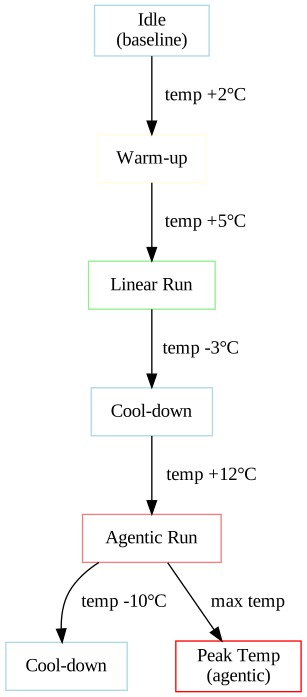
## 🌡️ Thermal Metrics
| Metric | Unit | Description |
|--------|------|-------------|
| `package_temp_celsius` | °C | CPU package temperature |
| `start_temp_c` | °C | Temperature at run start |
| `max_temp_c` | °C | Peak temperature |
| `thermal_delta_c` | °C | Temperature rise (max - start) |
| `thermal_gradient` | °C/s | Rate of temperature change |
**Thermal thresholds:**
- **< 60°C**: Normal operation
- **60-80°C**: Warm, still efficient
- **80-95°C**: Hot, possible throttling
- **> 95°C**: Thermal throttling active
### Thermal Profile Example
---
## 🔄 C-State Metrics
| Metric | Description | Power Savings |
|--------|-------------|---------------|
| `c2_time_seconds` | Time in C2 (light sleep) | Moderate |
| `c3_time_seconds` | Time in C3 (deeper sleep) | High |
| `c6_time_seconds` | Time in C6 (very deep) | Very high |
| `c7_time_seconds` | Time in C7 (package sleep) | Maximum |
**C-state residency** shows how efficiently the CPU enters low-power states during idle periods.
---
## 📊 Scheduler Metrics
| Metric | Description | High Value Indicates |
|--------|-------------|----------------------|
| `context_switches_voluntary` | Thread yielding | Normal operation |
| `context_switches_involuntary` | Forced preemption | Contention |
| `thread_migrations` | CPU hopping | Poor cache locality |
| `run_queue_length` | Runnable processes | System load |
| `interrupt_rate` | Interrupts per second | I/O activity |
---
## 🧠 Agentic Metrics
| Metric | Description | Typical Range |
|--------|-------------|---------------|
| `llm_calls` | Number of LLM invocations | 1-10 |
| `tool_calls` | Number of tool executions | 0-5 |
| `steps` | Total workflow steps | 1-15 |
| `complexity_level` | 1-3 scale | Task difficulty |
| `complexity_score` | 1-10 scale | Normalized complexity |
---
## 🌍 Sustainability Metrics
| Metric | Unit | Description |
|--------|------|-------------|
| `carbon_g` | g CO₂ | Carbon footprint |
| `water_ml` | ml | Water consumption |
| `methane_mg` | mg | Methane emissions |
**Country-specific factors** are applied based on grid intensity:
| Country | Carbon (g/kWh) | Water (ml/kWh) |
|---------|----------------|----------------|
| US | 0.389 | 2.1 |
| IN | 0.708 | 3.4 |
| FR | 0.055 | 1.2 |
| CN | 0.555 | 2.8 |
---
## 📈 Efficiency Metrics
| Metric | Formula | Good Value |
|--------|---------|------------|
| Energy per token | `workload / tokens` | < 0.01 J/token |
| Energy per instruction | `workload / instructions` | < 1e-9 J/inst |
| Instructions per token | `instructions / tokens` | > 1000 |
| Interrupts per second | `interrupt_rate` | < 5000 |
---
## 🔍 Sample Queries
### Get All Metrics for a Run
```sql
SELECT * FROM runs WHERE run_id = 977;
Compare Linear vs Agentic
SELECT
    r.workflow_type,
    AVG(r.dynamic_energy_uj/1e6) as avg_energy_j,
    AVG(r.duration_ns/1e9) as avg_duration_s,
    AVG(r.ipc) as avg_ipc
FROM runs r
WHERE r.exp_id = 185
GROUP BY r.workflow_type;
Find High Tax Experiments
SELECT
    e.exp_id,
    e.task_name,
    ots.tax_percent
FROM orchestration_tax_summary ots
JOIN runs r ON ots.linear_run_id = r.run_id
JOIN experiments e ON r.exp_id = e.exp_id
WHERE ots.tax_percent > 200
ORDER BY ots.tax_percent DESC;
📊 Metric Categories Summary
| Category | Key Metrics | Use For |
|---|---|---|
| Energy | workload, reasoning, tax | Core research |
| Performance | ipc, cache_miss_rate | CPU efficiency |
| Timing | phase times, latency | Bottleneck analysis |
| Thermal | temperature, delta | Cooling analysis |
| C-State | residency times | Power management |
| Scheduler | context switches | OS overhead |
| Agentic | llm_calls, steps | Workflow complexity |
| Sustainability | carbon, water | Environmental impact |
✅ Next Steps
- Run experiments
- View metrics in GUI
- Generate reports
--repetitions $REPS \
--providers $provider \
--save-db
done
done
done
---

## 📊 Batch Monitoring

### Watch Progress

```bash
# Watch runs appear in database
watch -n 5 "sqlite3 data/experiments.db '
SELECT
    COUNT(*) as total_runs,
    SUM(CASE WHEN workflow_type=\"linear\" THEN 1 ELSE 0 END) as linear,
    SUM(CASE WHEN workflow_type=\"agentic\" THEN 1 ELSE 0 END) as agentic
FROM runs;'"
Estimate Remaining Time
-- Calculate average time per run
SELECT
    AVG(duration_ns/1e9) as avg_duration_s,
    COUNT(*) as completed
FROM runs
WHERE exp_id = (SELECT MAX(exp_id) FROM experiments);
🔄 Resuming Interrupted Batches
If a batch is interrupted, you can resume:
# Find last completed run
sqlite3 data/experiments.db "
SELECT MAX(run_number) FROM runs
WHERE exp_id = (SELECT MAX(exp_id) FROM experiments)
AND workflow_type = 'agentic';"

# Resume from next repetition
python -m core.execution.tests.run_experiment \
    --tasks gsm8k_basic \
    --repetitions 30 \
    --providers local \
    --save-db \
    --start-from 16  # Resume from rep 16
📈 Example: Complete Research Protocol
#!/bin/bash
# research_protocol.sh

# Configuration
TASKS="gsm8k_basic,gsm8k_multi_step,logical_reasoning"
PROVIDERS="cloud,local"
REPS=30
COOLDOWN=5

# Create experiment directory
EXP_DIR="experiments/$(date +%Y%m%d_%H%M%S)_protocol"
mkdir -p $EXP_DIR

# Run experiments
python -m core.execution.tests.run_experiment \
    --tasks $TASKS \
    --repetitions $REPS \
    --providers $PROVIDERS \
    --cool-down $COOLDOWN \
    --save-db \
    --verbose 2>&1 | tee $EXP_DIR/batch.log

# Export results
python scripts/tools/experiment_archiver.py \
    --group-id latest \
    --format csv \
    --output $EXP_DIR/results.csv

# Generate summary report
python scripts/tools/report_generator.py \
    --exp-id latest \
    --output $EXP_DIR/report.pdf

echo "✅ Experiment complete. Results in $EXP_DIR"
✅ Best Practices
| Practice | Why |
|---|---|
| Use 30+ repetitions | Statistical significance |
| Include cool-down | Prevent thermal throttling |
| Randomize order | Avoid systematic bias |
| Log everything | Reproducibility |
| Export raw data | Future analysis |
| Document conditions | Paper methodology |
📊 Sample Size Calculator
def required_repetitions(effect_size=0.1, power=0.8, alpha=0.05):
    """
    Calculate required repetitions for desired statistical power.

    Args:
        effect_size: Expected effect size (e.g., 10% difference)
        power: Desired statistical power (0.8 = 80%)
        alpha: Significance level (0.05 = 95% confidence)

    Returns:
        Minimum repetitions needed
    """
    import scipy.stats as stats
    z_power = stats.norm.ppf(power)
    z_alpha = stats.norm.ppf(1 - alpha/2)
    n = ((z_alpha + z_power) / effect_size) ** 2
    return int(np.ceil(n))